
Claude Code Part2: Building a Feature
In Part 1, I introduced Claude Code and got it installed. That post was intentionally light on hands-on work. This one isn’t. We’re going to give Claude Code a real project, give it real context about that project, and have it build an actual feature from a plain-English request. By the end, you’ll understand the two things that make Claude Code useful for anything beyond toy demos: persistent project memory through CLAUDE.md, and the plan-then-act loop that keeps you in control while it works.
The Project We’re Building On
To keep this concrete, I’m going to use a small Python CLI tool I threw together called hexutil. You can find the code for the project on GitHub. If you read my earlier post on hexadecimal, this will feel familiar: it’s a command-line utility that converts values between decimal, binary, and hex. Right now it only handles one value at a time:
$ hexutil convert 255
0xff
The feature I want: a --batch flag that reads a file full of values, one per line, and converts all of them in one pass. Small enough to walk through in a blog post, real enough to show you what the workflow actually looks like.
Give Claude Code Persistent Memory
Before I ask for anything, I want Claude Code to actually understand this project: how it’s structured, what conventions I follow, how to run the tests. That’s what CLAUDE.md is for. It’s a markdown file you drop in your project root, and Claude Code reads it at the start of every session. Think of it as onboarding notes for a new team member, except this team member reads them every single time instead of forgetting by Thursday.
Here’s a stripped-down version of the one I wrote for hexutil:
# hexutil

A small CLI for converting values between decimal, binary, and hex.

## Structure
- `hexutil/cli.py` - command definitions (built with Click)
- `hexutil/convert.py` - conversion logic, no CLI dependencies
- `tests/` - pytest, mirrors the module structure

## Conventions
- Conversion logic stays out of cli.py. CLI functions call into convert.py.
- Every new command needs a corresponding test in tests/.
- Run tests with: pytest

## Style
- No type hints. Comments explain behavior; keep signatures clean.
- Use `#` comments, not docstrings - except on Click commands/groups,
  where the docstring is the `--help` text and is required.
- Small, single-purpose functions.
- Prefer EAFP (try/except) over checking types up front.
- No third-party deps beyond Click.
That’s it. Nothing fancy. But it means I don’t have to explain, in every session, that conversion logic doesn’t belong in the CLI layer, or that I run tests with pytest and not python -m unittest. Claude Code also builds its own auto memory as it works, quietly saving things like build commands and debugging insights across sessions, so this file tends to get less necessary over time, not more. Still, for architecture decisions and conventions you actually care about enforcing, write them down.
Prompting for the Feature
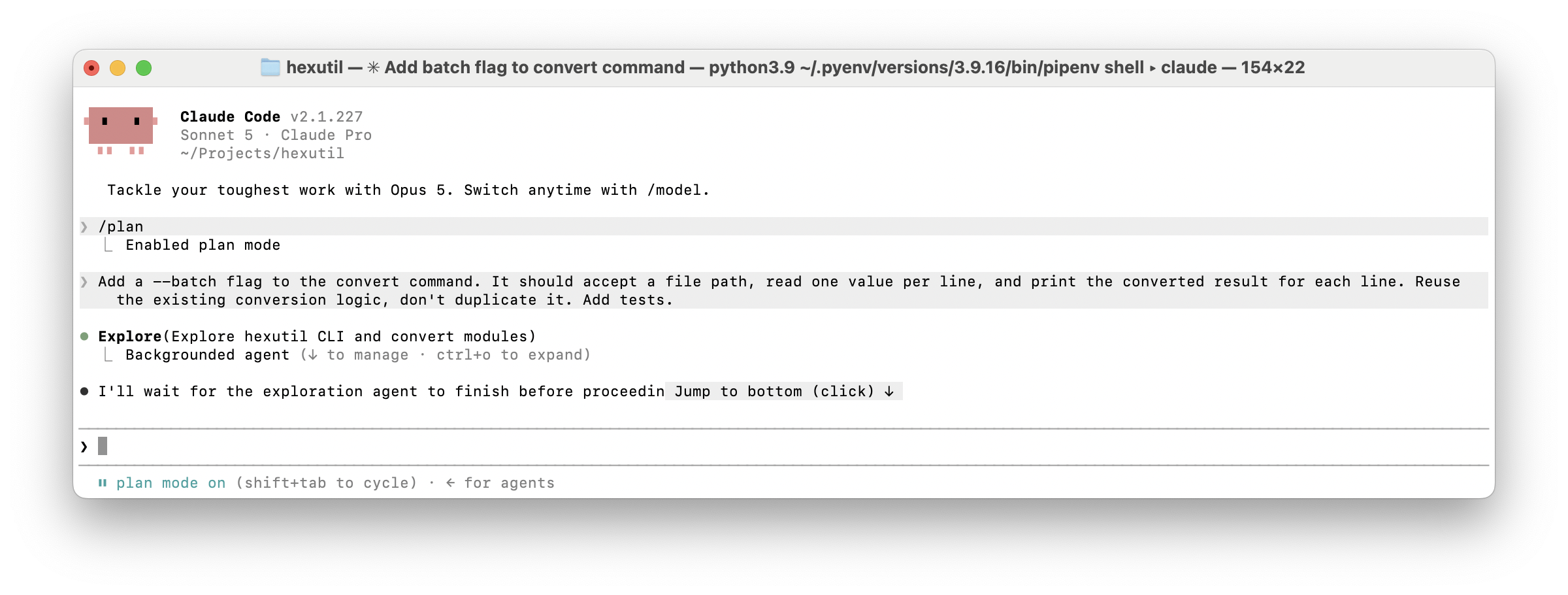
With CLAUDE.md in place, I dropped into the project and asked for the feature the same way I’d describe it to a colleague:
$ claude
> Add a --batch flag to the convert command. It should accept a file path,
> read one value per line, and print the converted result for each line.
> Reuse the existing conversion logic, don't duplicate it. Add tests.
What happened next is the part that’s different from autocomplete tools. Claude Code didn’t just start typing code. It read cli.py and convert.py first, worked out where the existing conversion logic lived, and laid out a short plan: add a --batch option to the Click command, write a small function to read and iterate the file, reuse convert.py for each line, and add a test file exercising the new path.
Watching It Work
By default, Claude Code asks before it does anything that changes state; editing a file, running a shell command, and so on. It shows you the diff before it lands, not after. When it proposed the change to cli.py, I got a diff to review, approved it, and it moved to the test file the same way.
If you’d rather not review every single edit, Shift+Tab cycles between permission modes mid-session: the default mode that asks about everything, one that auto-approves file edits but still asks before running commands, and a read-only plan mode that won’t touch anything until you sign off on the whole plan up front. I stayed in the default mode for this one since it was a small change, but for anything touching a shared codebase, plan mode is worth knowing about.
Once the code was in place, it ran the test suite itself:
$ pytest
==================== 6 passed in 0.14s ====================
Six passed, not five. It had written a new test for the batch path, and it didn’t announce that the feature was done until that test was green.
What This Bought Us
None of that individual step is magic. I could have written the flag, the file-reading loop, and the test myself in fifteen minutes. The difference is what it costs me to do it this way: I described a feature once, in a sentence, and reviewed diffs instead of writing them. On a project I rarely context-switch into, that CLAUDE.md file means I’m not re-explaining my own conventions to myself every time I sit back down.
That’s also the seam where this starts to scale past a single feature on a single afternoon. In Part 3, I’ll cover git workflows, connecting Claude Code to other tools through MCP, and setting up recurring automation, taking it from “I asked for one thing and it did it” to “this runs without me.”
Conclusion
The combination that matters here is memory plus a visible plan. CLAUDE.md means Claude Code isn’t starting from zero every session, and the ask-before-acting default means you’re reviewing its reasoning, not just its output. Try it on something small in your own codebase: write a short CLAUDE.md, ask for one real feature, and actually read the plan before you approve it.
Part 3 will cover Git workflows, MCP integrations, and automating recurring tasks.